Audit Trail
Open Docket automatically logs all significant actions in the system. No configuration is required — every create, update, and delete is recorded.
What Is Logged
The following record types generate activity log entries:
- Tickets
- Contacts
- Comments
- Reminders
- Costs
- Ticket Types
Where to View Activity
1. Ticket Timeline Tab
Activity log entries for a specific ticket are shown in the ticket's Timeline tab, merged chronologically with comments. See Timeline.
2. Dashboard → Recent Activity
The Dashboard shows the last 10 activity entries across all records in the Recent Activity section.
3. Activity Page (/activity)
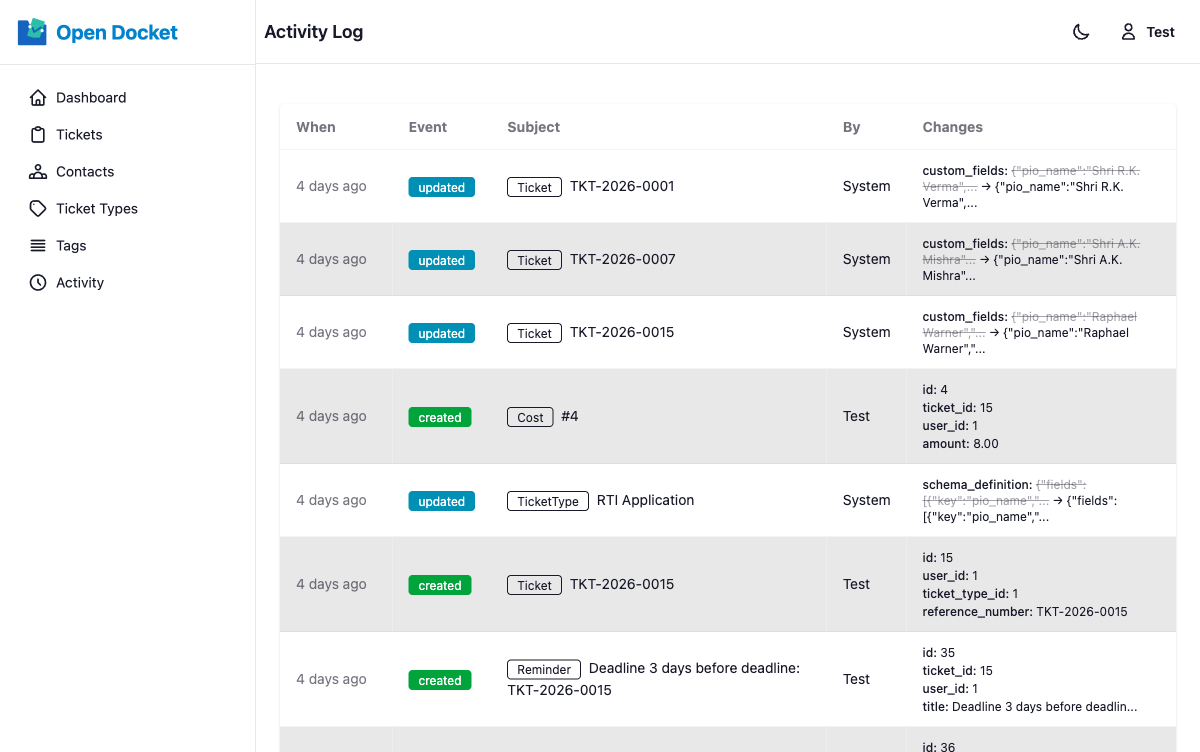
The full activity log is available at /activity. This page shows:
- All events in the system
- 50 entries per page, latest first
What Each Entry Shows
| Field | Description |
|---|---|
| Event badge | Created (green), Updated (blue), or Deleted (red) |
| User | The user who performed the action, or "System" for automated events |
| Subject | A clickable link to the affected record |
| Changed fields | Up to 3 changed field names with old → new values |
| Timestamp | Displayed as a time-ago value (e.g. "5 minutes ago") |